
What's New • Digital Banking

Exciting Changes Are Coming to Digital Banking 

A modern, more powerful way to manage your money. 

Explore the upgraded dashboard, easier account opening, smarter tools, and enhanced security.

A More Modern, Intuitive Experience

We’ve refreshed the entire Digital Banking experience to feel smoother, faster, and easier to use, whether you log in from your computer, tablet, or phone. From checking a balance to sending a payment, every step has been simplified to help you complete tasks quickly and confidently.

  • Faster performance and improved load times
  • Cleaner page layouts for better readability
  • Clear, consistent menus across desktop and mobile
  • Improved search and navigation to key tools

Getting Started Guide 


What's New in Digital Banking


New Dashboard

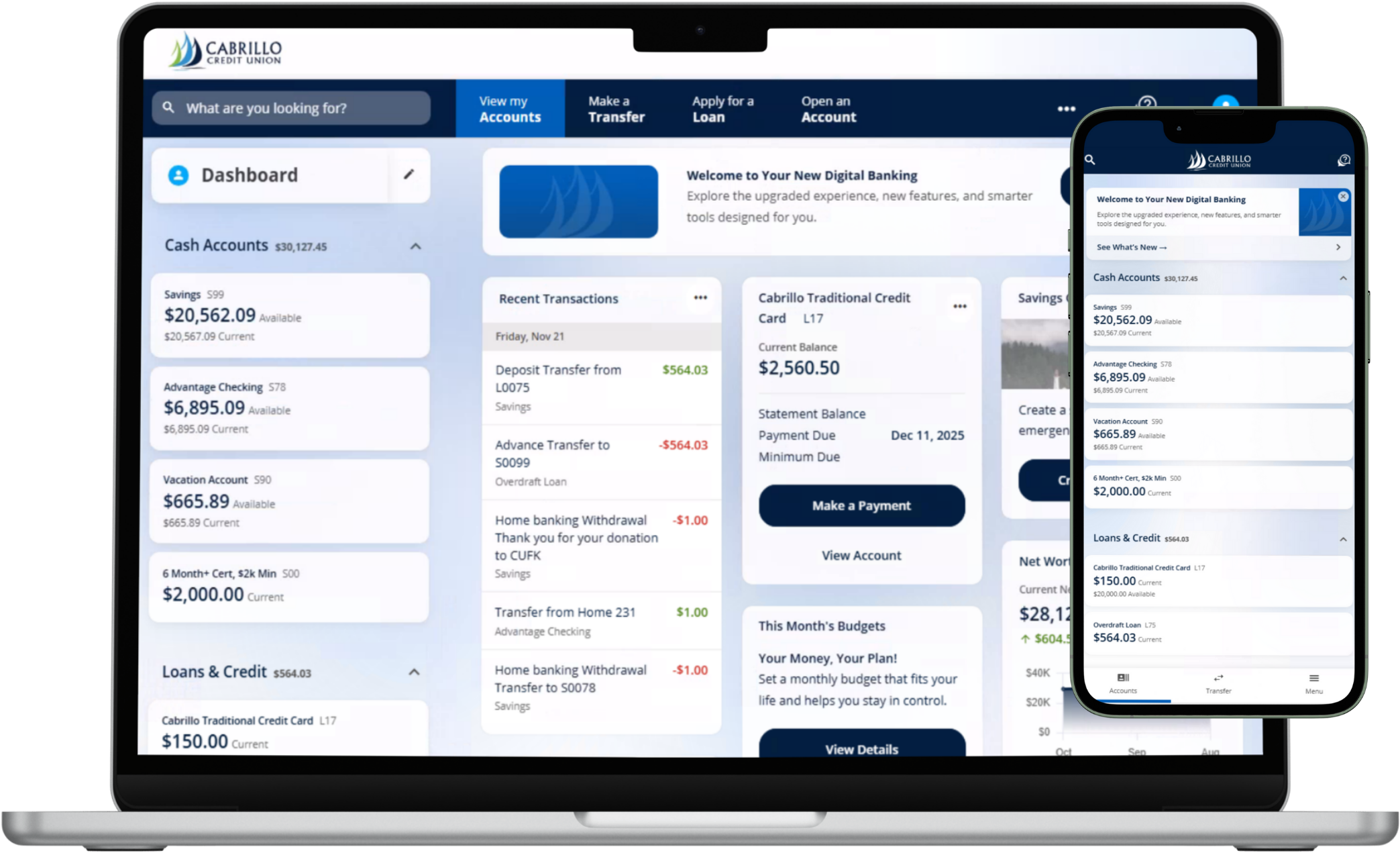
The new dashboard gives you a clear, personalized view of your accounts, balances, and activity the moment you log in.

Transfers & Payments

Easily move money, pay bills, and manage loan payments all in one place with streamlined Transfers & Payments.

Integrated Card Controls

Card Controls are fully integrated, letting you manage spending, alerts, and travel notifications in just a few taps.

Account Opening

Open new accounts directly within Digital Banking quickly and securely without visiting a branch.

Enhanced Security

Enhanced security features help protect your account with advanced authentication and real-time monitoring.

Direct Deposit Setup

Set up or update direct deposit right inside Digital Banking for faster, more convenient access to your funds.


Your App is  Getting an Update:


When the new Digital Banking experience launches, the Cabrillo Credit Union mobile app will update automatically on most devices. Make sure your phone is powered on and connected to Wi-Fi so the update can download smoothly. You will notice the app icon change as part of the upgrade — this is normal and simply means you’re using the new, enhanced version of Digital Banking.
 

You can now access your card faster and more securely with our new Digital Card features. Add your card instantly to Apple Pay™, Google Pay™, or Samsung Pay using Push to Wallet, so you can start using it right away — even before your physical card arrives. You can also view your full digital card details inside Digital Banking, including card number, expiration date, and security code, making online and in-app purchases easier and more convenient!
 

Your new dashboard puts what matters most front and center. See your balances, recent transactions, upcoming payments, and key tools in one simple view.

Updated Look & Feel

A cleaner, modern interface makes it easier to quickly scan your accounts and find what you need — no extra clicks, no clutter.

Improved Account Layout

Accounts are grouped and labeled more clearly, so you can easily tell which share, loan, or card you’re viewing at a glance.

Smarter Organization of Tools

Transfers, payments, card controls, alerts, and settings are organized into intuitive menus to help you move through tasks faster.

Streamlined Access

Quickly jump into balances, transaction history, scheduled payments, and key actions directly from your dashboard tiles.
Why It Matters

The upgraded dashboard is designed to save you time. Instead of navigating through multiple screens, you’ll be able to see your financial picture and take action from one central place.

Moving money is now more flexible and convenient. Whether you’re paying a loan, sending money to another member, or scheduling bills, it’s all in one place.

Instant Transfers

Transfer funds instantly between your Cabrillo accounts — perfect for moving money from savings to checking or paying down a loan.

One-Time & Recurring Payments

Set up one-time payments or create recurring schedules so regular payments happen automatically, on the dates you choose.

Member-to-Member Transfers

Easily send money to another Cabrillo member. All you need is their information — no third-party apps required.

Faster Bill Pay Access

Bill Pay is easier to find, easier to set up, and easier to manage, with clearer payee lists and streamlined scheduling.

Take more control over how, when, and where your Cabrillo cards are used — all from within Digital Banking.

Lock & Unlock Instantly

Misplace your card? Lock it right away. Find it again? Unlock it with a tap.

Spending Limits & Categories

Set spending limits and control merchant categories to better align card usage with your budget and goals.

Control Transaction Types

Choose which types of purchases are allowed, such as in-store, online, or ATM transactions.

Location & Region Controls

Manage where your card can be used by setting regions or locations for added protection against unauthorized use.

Travel Notifications Built Right In

Heading out of town? Let us know directly through Digital Banking so your cards keep working smoothly wherever you go.

  • Notify Cabrillo of your upcoming trips in just a few clicks
  • Add travel dates and destinations without calling in
  • Reduce the chance of card interruptions while you travel

Enhanced Security in Real Time

These controls help you respond quickly to unusual activity and tailor card usage to your lifestyle.

Your security is at the center of the upgraded platform. We’ve added more ways to protect your information and verify your identity.

Advanced Authentication Options

Choose from multiple authentication methods for added protection when you log in.

Two-Factor Authentication

Add an extra layer of security beyond your username and password.

Subscription Alerts

Get alerted in real time for your accounts and cards and receive updates.

Push Approvals

Approve logins and sensitive actions via secure push notifications, helping you stop suspicious activity fast.

When you’re ready to add another savings account, checking account, or other products, you can apply directly within the new experience.

  • Start applications from your dashboard
  • Enjoy a faster, more streamlined application flow
  • Stay within a secure, member-focused environment

Setting up Direct Deposit is now more convenient, whether it’s for your paycheck or other recurring deposits. Add your Direct Deposit in a few clicks or easily provide your information .

Quick Access to Details

Find your routing and account numbers quickly so you can share them with your employer or benefits provider.

Faster Deposit Availability

Once your Direct Deposit is set up, you can enjoy faster and more consistent access to your funds.

The mobile experience is more powerful than ever, with tools that keep you connected and in control wherever you are.

Face ID / Touch ID Login

Log in quickly and securely using biometric authentication on supported devices.

Mobile Check Deposit

Deposit checks from your phone by snapping a photo — no trip to a branch required.

Push Authentication

Approve sign-ins and sensitive actions using secure push notifications.

Real-Time Alerts

Set up alerts for balances, transactions, and more so you always know what’s happening with your accounts.

PLUS: Smarter Financial Management Tools

Your upgraded Digital Banking experience includes powerful tools designed to help you understand your financial habits, track progress, and make confident money decisions. These features are built right in — no extra apps or subscriptions needed.

MyCreditScore

Get real-time access to your credit score, full reports, alerts, and personalized recommendations. Stay informed and monitor the factors that influence your credit — all in one place.

Spending Analysis

Easily track where your money is going. View spending by category, identify trends, and see a clearer picture of your monthly financial activity with intuitive charts and breakdowns.

Financial Health Checkup

Access personalized tips and guidance designed to help you reach your financial goals. Evaluate your spending, saving, and income habits with a smart, easy-to-use financial wellness tool.

Why It Matters

These built-in tools help you stay proactive, make informed decisions, and build stronger financial habits — all directly within your new Digital Banking dashboard.

Access Digital Banking on Desktop or Mobile

Bank your way — whenever and wherever it’s convenient. Access Cabrillo Credit Union’s Digital Banking from your computer at CabrilloCU.com, or download the Cabrillo Credit Union Mobile App from the Apple App Store or Google Play. When the upgrade goes live on February 3, 2026, simply log in as usual from our website or the new mobile app. You’ll be guided through any first-time steps needed.


Check balances, transfer funds, pay bills, and manage your accounts securely — right from your phone, tablet, or desktop.


FAQs

When does the new Digital Banking experience launch?

Cabrillo Credit Union’s upgraded Digital Banking experience launches February 3, 2026.

Will I receive more information before the new Digital Banking experience launches?

Yes. We’ll continue to share updates leading up to launch, including what to expect, how to log in, and any actions you may need to take. Our goal is to make sure you feel confident and prepared when the new experience goes live.

How will Cabrillo communicate important updates?

We’ll send information through email, Digital Banking messages, and our website. Be sure your contact information is up to date so you don’t miss any important details as we get closer to launch.

Will my accounts stay the same?

Yes. Your accounts will stay the same — we’re upgrading the Digital Banking experience and tools you use to manage them. The update gives you a modern design, smarter features, and improved navigation, all while keeping your existing accounts and balances in place.

What can I do with Cabrillo’s Online & Mobile Banking?

With Digital Banking, you have the credit union at your fingertips anytime, anywhere. You can view balances, transfer money between accounts (including other institutions), pay bills, monitor your credit score, manage account alerts, and even apply for loans.

Can I pay my bills through Online Banking?

Yes. Our Bill Pay feature makes it easy to set up one-time or recurring payments, so you never miss a due date. You can manage everything from utilities to credit card bills directly in Digital Banking.

What if I forgot my username?

If you forget your username or password, click on Forgot your username or password? Link at the login screen. Select the I Don't Know my Username button and follow the prompts to obtain your username.

How do I view my statements online?

You can enroll in eStatements to see your monthly statements securely inside Digital Banking by selecting Documents and Statements from the menu. Click on Online Statements only to enroll and view your statements.

Can I deposit checks with the mobile app?

Yes, you have to be enrolled in Digital Banking. Once enrolled, with Mobile Deposit, just snap a photo of your check using the rear-facing camera on your device and deposit it directly into your account. It’s quick, secure, and saves you a trip to the branch.

Can I transfer money to another financial institution?

Yes. Digital Banking makes it simple to transfer funds between your Cabrillo accounts and accounts you have elsewhere. You can set up one-time or recurring transfers with just a few clicks.

Does Digital Banking have Zelle?

Absolutely. Cabrillo’s Digital Banking includes Zelle®, so you can send and receive money in minutes using just an email address or mobile number. It’s fast, secure, and a great way to split bills or pay someone back.

How secure is Online & Mobile Banking?

Your security is a top priority. We use, 2FA, push notifications, HTTPS encryption, EMV-enabled card integration, biometric login options like Face ID, and account alerts to help protect your information.

Can I apply for a loan through Online Banking?

Yes. You can apply for loans, credit cards, and other products directly inside Digital Banking. The application process is streamlined, and you can track the status of your request from your account.

Recognized as one of America's Best
Regional Banks and Credit Unions 2026

by Newsweek and Plant-A Insights Group