
Digital Banking Transition

Get ready for Cabrillo Credit Union’s Digital Banking

A modern, more powerful way to manage your money. 

As a North County Credit Union Member, you’ll soon access all your accounts through Cabrillo Credit Union’s Digital Banking platform.

What to Expect as a North County Credit Union Member

Your banking relationship is moving into a modern, more powerful platform — with new cards, a new app, and new tools designed to make everyday money management easier. This guide explains what to expect, how to log in for the first time, and how to make the most of your new tools.

New Debit Cards

Your new Cabrillo Credit Union debit card will arrive before launch. Beginning February 2, once activated, it will replace your current North County Credit Union debit card. If you don’t receive your card within the expected delivery timeframe, please contact our Virtual Service Center at 858-547-7400, and we’ll be happy to assist you.

Download the App (Starting Feb 3)

Beginning February 3, download the Cabrillo Credit Union app from the App Store (iOS) or Google Play (Android) to access your accounts on the go. Your current NCCU app is going away. Simply delete it after you download the new Cabrillo Credit Union app to continue mobile banking.

Access Digital Banking on Desktop or Mobile

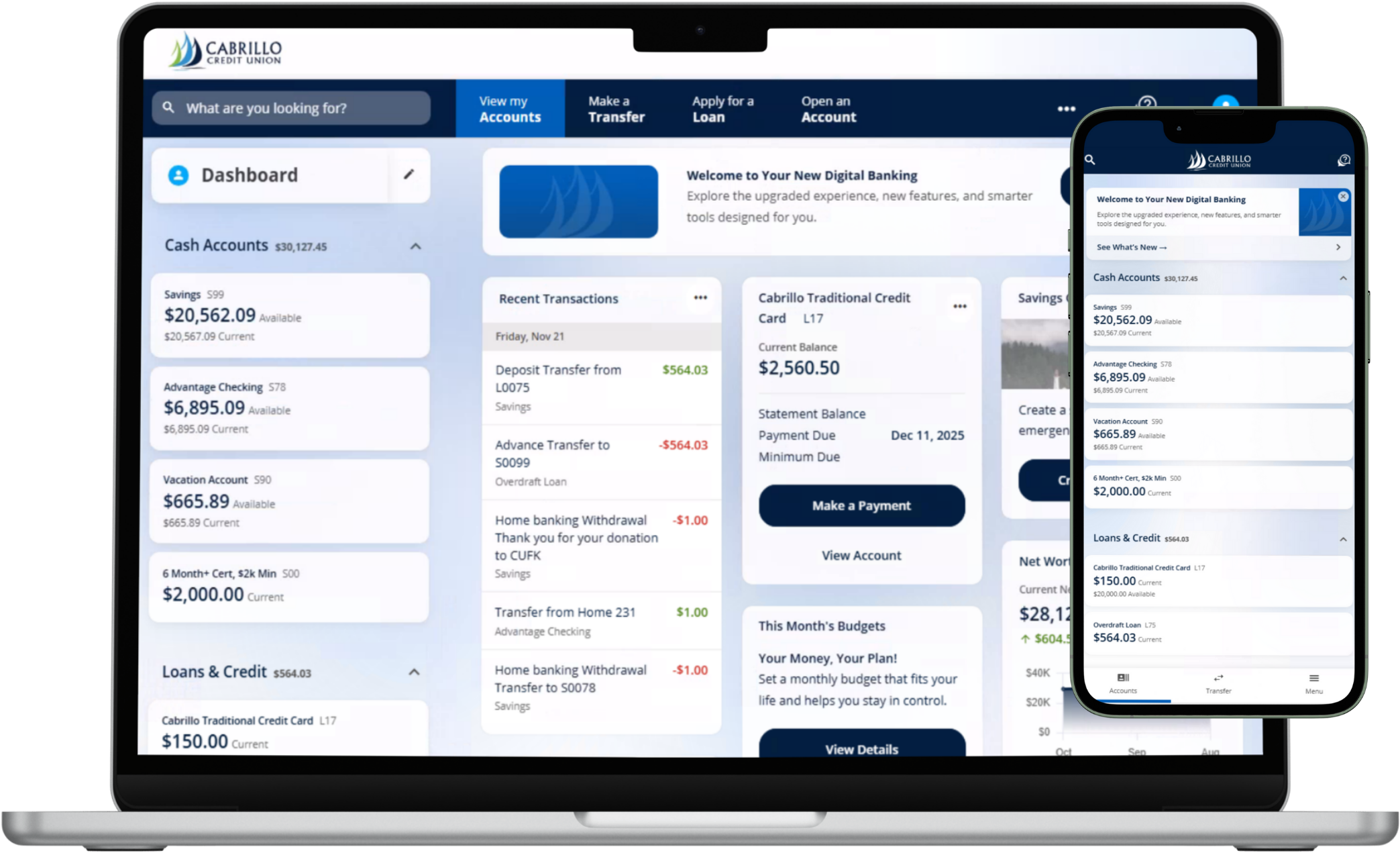
Bank your way — whenever and wherever it’s convenient. Access Cabrillo Credit Union’s Digital Banking from your computer at CabrilloCU.com, or download the Cabrillo Credit Union Mobile App from the Apple App Store or Google Play. When the upgrade goes live on February 3, 2026, simply log in as usual from our website or the new mobile app. You’ll be guided through any first-time steps needed.


Check balances, transfer funds, pay bills, and manage your accounts securely — right from your phone, tablet, or desktop.


Once the new Digital Banking experience is live, follow these simple steps to get started.

  1. Start from the Website or Mobile App

    On a computer, visit CabrilloCU.com and login as you normally would with your North County Credit Union user name and password. Click Secure Login and you'll be taken to the getting started login screen where you'll verify your personal info.

  2. Verify Your Personal Info and Identity

    To enroll, you’ll be asked to provide:

    • Your First and Last Name
    • Your Date of Birth
    • Your Social Security Number

    Enter this information and select Continue. Choose how you’d like to receive a one-time confirmation code to authenticate — via text message, voice message, or email. Confirm your contact source, then enter the code you receive and tap Continue to verify.

  3. Authenticate your account by entering the verification code sent to your preferred communication method. Tap Next. 

  4. Reset and Select your Password

    Once you confirm your verification code, select and confirm your new password and tap Next. These will be the credentials you use to access Digital Banking going forward.

  5. Review and Accept the Legal Agreements

    Review the Online Banking Disclosure. When you’re ready, select Accept & Continue to move on.

  6. Review Your Contact Information

    Review your contact information on file. If everything looks correct, click Confirm to complete your enrollment. If anything needs to change, click the pencil to edit.

  7. Start Using Digital Banking

    That’s it — you’re now enrolled in Cabrillo’s Digital Banking platform. You can begin depositing checks, paying bills, transferring funds, using Card Controls, and more — all in one convenient place.

Need Help?

If you have questions during activation, our team is here to help. 

Step-by-Step Enrollment Guide 

If you have never enrolled in North County Credit Union's Digital Banking platform, follow the steps below.

Both the website and mobile app will take you to the same Digital Banking enrollment screen. Choose the option that’s easiest for you.

  1. Start from the Website or Mobile App

    You can begin on a computer or your mobile device.

    • Website: Visit CabrilloCU.com and select Secure Login.
    • Mobile App: Download the Cabrillo Credit Union mobile app from the App Store or Google Play. Open the app to get started.

    Both options will take you to the Digital Banking enrollment screen. 

  2. Verify Your Personal Information and Identity

    To enroll, you’ll be asked to enter the following information:

    • Your Social Security Number
    • Your date of birth
    • Your first and last name

    After entering your information, select Continue. Choose how you’d like to receive a one-time verification code, such as text message, voice call, or email. Confirm your contact method, enter the code you receive, and select Next to authenticate your account. 

  3. Create Your Username and Password

    Once your verification code is confirmed, you’ll be prompted to create a new username and password using the requirements provided on screen. These credentials will be used to access Digital Banking going forward. After entering your information, select Register.

  4. Review and Accept the Legal Agreements

    Next, you’ll review the Online Banking Disclosure. When you’re ready, select Accept & Continue to proceed.

  5. Confirm Your Contact Information

    Review your contact details and address on file. If everything is correct, select Confirm. If any updates are needed, you can edit the information before confirming.

  6. Get Started with Digital Banking

    Once confirmed, you’ll be welcomed into the new Digital Banking onboarding experience. Click Next to learn what’s new and start enjoying your enhanced Digital Banking features. You’re now ready to begin using Digital Banking to deposit checks, pay bills, transfer funds, manage cards, and more anytime, anywhere.

  7. After registration, sign in and explore:

  • Bill Pay to manage and schedule payments
  • Zelle® for fast, secure person-to-person payments
  • Card Controls to lock/unlock your card and set limits
  • Direct Deposit to help you get paid faster
  • eStatements and digital documents
  • Financial wellness tools, including credit score insights and spending analysis

Need Help?

If you have questions during enrollment or trouble receiving your verification code, please contact us. We’ll help guide you through the registration process.

Debit Card Usage

During parts of the transition, some NCCU debit cards may be restricted to point-of-sale (POS) transactions only. Your card will still be available for use, but with lowered purchase and POS limits. If you have any questions about these limits, please contact us and we’ll be happy to help. This is temporary and helps ensure a secure upgrade to your new Cabrillo card. If your card is one of these, you will be notified prior to the transistion.

Once your new Cabrillo debit card is activated, it will become your primary card for everyday purchases, ATM withdrawals, and digital wallet use.


Product & Account Mapping

Your NCCU shares and loans will be carefully mapped to Cabrillo’s product lineup. You may notice updated product names, descriptions, or labels in your new Digital Banking view. Your balances and account history will remain intact.
Changes During the Transition

To complete the upgrade, we’ll need a short window where online and mobile banking access changes for NCCU members.

Friday & Saturday (Weekend Before Feb 3)

Online and mobile banking will be in read-only mode. You’ll be able to view balances and recent activity, but you won’t be able to make changes, transfers, or new payments.

Sunday, Monday, and Early Tuesday

Online and mobile banking will be in a temporary blackout period while we complete the transition to Cabrillo’s upgraded Digital Banking system.

Launch Day (Tuesday, February 3)

Once the upgrade is complete, we will notify you via email and website updates. You’ll be able to log in using the new Cabrillo platform via CabrilloCU.com our our mobile app. We’ll notify you as soon as full access is restored and it’s time to register and explore your new tools.

Plan Ahead for the Upgrade Weekend

We’re making important upgrades to bring you a better digital banking experience. Please plan ahead by completing any urgent transactions, transfers, or Bill Pay changes before the access changes begin. We’ll notify you as soon as service is fully restored. Thank you for your patience as we work to bring you the best digital tools possible.


FAQs

When does the new Digital Banking experience launch?

Cabrillo Credit Union’s upgraded Digital Banking experience launches February 3, 2026.

What can I do with Cabrillo’s Online & Mobile Banking?

With Digital Banking, you have the credit union at your fingertips anytime, anywhere. You can view balances, transfer money between accounts (including other institutions), pay bills, monitor your credit score, manage account alerts, and even apply for loans.

Can I pay my bills through Online Banking?

Yes. Our Bill Pay feature makes it easy to set up one-time or recurring payments, so you never miss a due date. You can manage everything from utilities to credit card bills directly in Digital Banking.

How do I view my statements online?

You can enroll in eStatements to see your monthly statements securely inside Digital Banking by selecting Documents and Statements from the menu. Click on Online Statements only to enroll and view your statements.

Can I deposit checks with the mobile app?

Yes, you have to be enrolled in Digital Banking. Once enrolled, with Mobile Deposit, just snap a photo of your check using the rear-facing camera on your device and deposit it directly into your account. It’s quick, secure, and saves you a trip to the branch.

Can I use Digital Banking to skip a loan payment?

Yes. You can complete a Skip-A-Payment request directly through Online Banking. It’s a convenient way to manage your budget when you need some extra breathing room. Remember, certain loans can't be skipped. Reach out to a member service representative if you have questions about your loan.

Can I transfer money to another financial institution?

Yes. Digital Banking makes it simple to transfer funds between your Cabrillo accounts and accounts you have elsewhere. You can set up one-time or recurring transfers with just a few clicks.

Does Digital Banking have Zelle?

Absolutely. Cabrillo’s Digital Banking includes Zelle®, so you can send and receive money in minutes using just an email address or mobile number. It’s fast, secure, and a great way to split bills or pay someone back.

How secure is Online & Mobile Banking?

Your security is a top priority. We use, 2FA, push notifications, HTTPS encryption, EMV-enabled card integration, biometric login options like Face ID, and account alerts to help protect your information.

Can I apply for a loan through Online Banking?

Yes. You can apply for loans, credit cards, and other products directly inside Digital Banking. The application process is streamlined, and you can track the status of your request from your account.

Recognized as one of America's Best
Regional Banks and Credit Unions 2026

by Newsweek and Plant-A Insights Group